> For the complete documentation index, see [llms.txt](https://doc.thordata.com/doc/llms.txt). Markdown versions of documentation pages are available by appending `.md` to page URLs; this page is available as [Markdown](https://doc.thordata.com/doc/scraping/web-scraper-api/integrations.md).
# Integrations
Connect Web Scraper API results to Webhooks, Amazon S3, Snowflake, and Gmail for notifications, storage, data warehousing, and automated workflows.
Thordata supports seamless integration with various services, systems, and web automation processes to help you handle data more efficiently and enhance the intelligence of your business workflows.\
With our integration features, you can unify independent scraping tools into a centralized platform and automate your workflows, delivering more with less effort. We’ve specifically designed the Web Scraper integration functionality to connect your data collection processes to cloud services, web applications, and more—turning data into a truly efficient asset for your projects.
**Supported Integration Methods**\
Currently, the Thordata platform supports the following integrations:
1. **Webhook**\
Receive real-time notifications when key events occur (such as task completion or failure), allowing for timely follow-up and response.
2. **Amazon S3**\
Send successful data results directly to your specified S3 bucket for long-term storage and management.
3. **Snowflake**\
Automatically sync task results to your Snowflake data warehouse for easy analysis and modeling.
4. **Gmail**\
Two options are available:\
① Get notified of key events (e.g., task success or failure) via email.\
② Send data results as attachments to specified email addresses for convenient access by you or your team.
**Getting Started with Integrations**\
If you're developing a product or service and want to offer users powerful data automation capabilities, Thordata integrations are the perfect solution. With simple setup, you can connect seamlessly with existing systems and output results efficiently.\
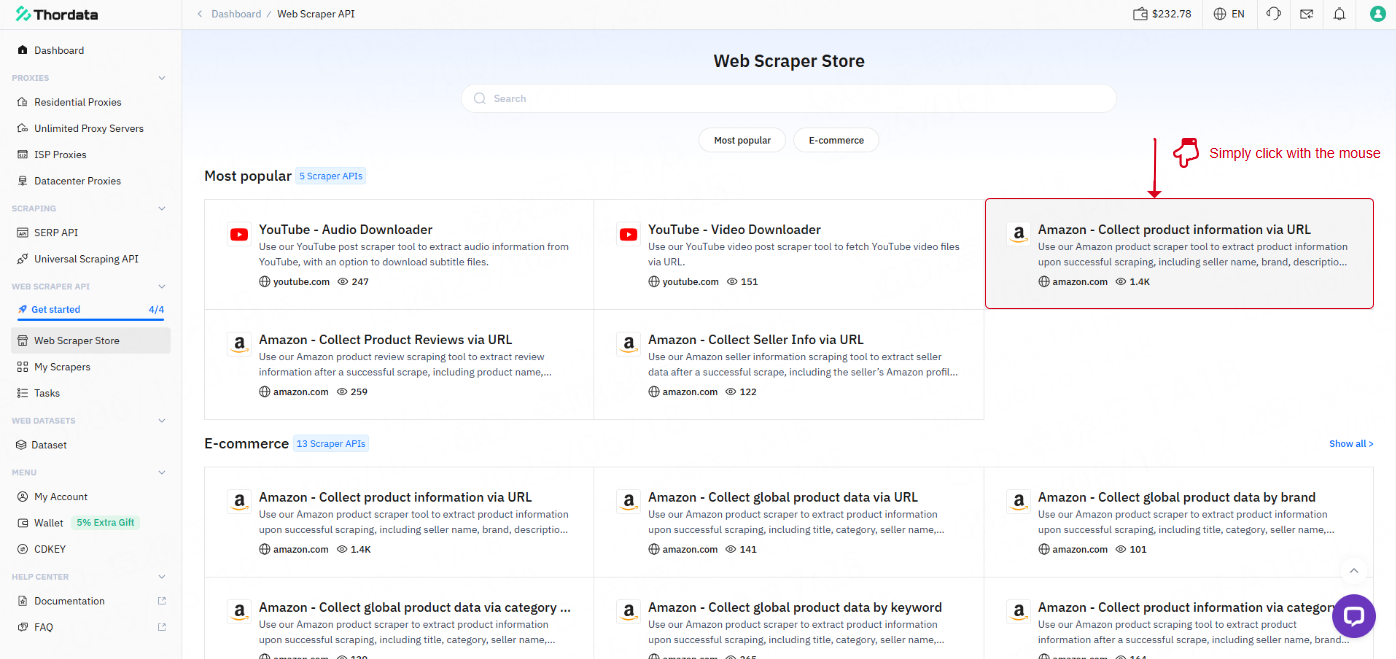
Next, you can visit the Web Scraper Store to explore various integration plugins and use cases and build a workflow that suits your needs.\
For example, if you select: “Amazon – Collect product info via URL”\
You'll find the “Integration” feature directly on the scraper detail page.
For further assistance, feel free to contact us at **** — we’re happy to help.