> For the complete documentation index, see [llms.txt](https://doc.thordata.com/doc/llms.txt). Markdown versions of documentation pages are available by appending `.md` to page URLs; this page is available as [Markdown](https://doc.thordata.com/doc/zh-hk/dai-li/shu-ju-zhong-xin-dai-li/zhang-hao-guan-li-yu-she-ding.md).
# 帳號管理與設定
## 建立代理帳號
1. 設定以下資訊:
* 代理帳號名
* 密碼
* 帳號狀態:啟用或停用
* 流量限制:選擇「無限制」或設定特定流量上限(單位:MB)
2. 點擊「儲存」以啟用設定。
快速功能:使用「一鍵新增」功能,系統將自動生成帳號名與密碼。
 ## 共享代理使用設定
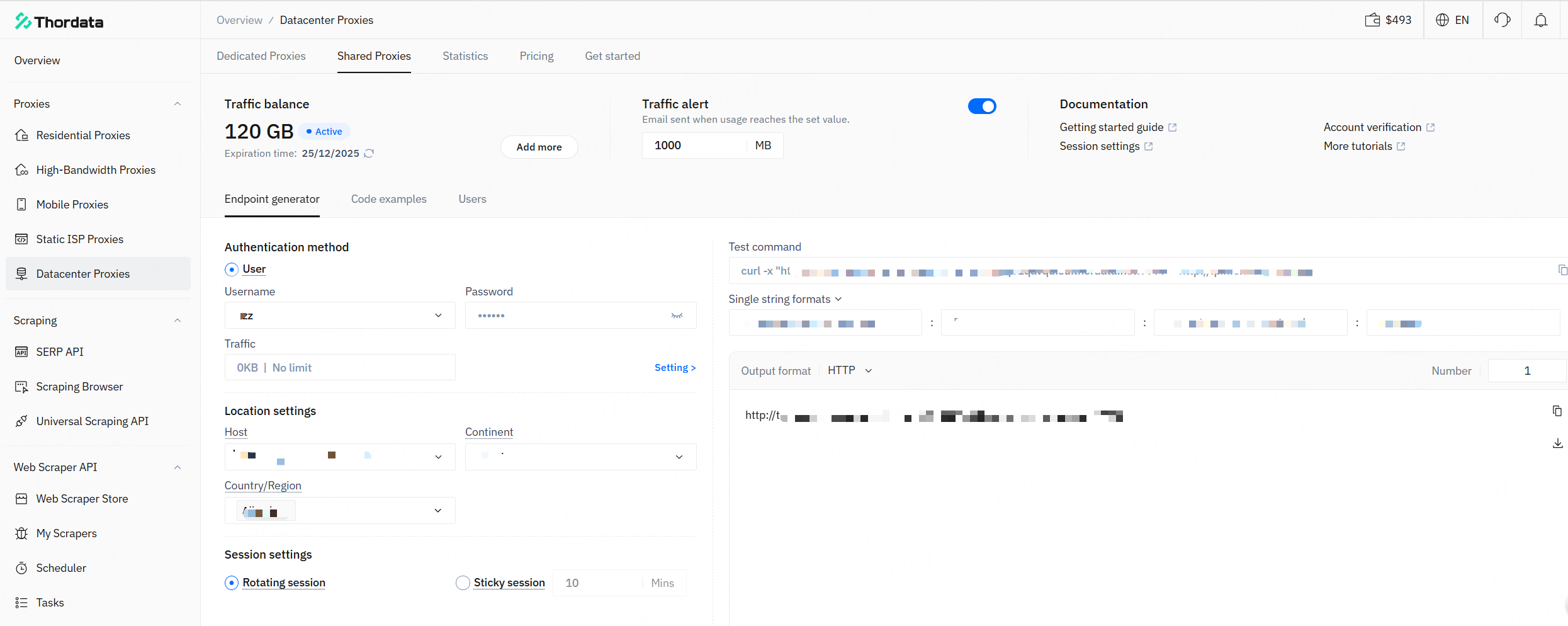
### **端點產生器**
定位:快速設定工具
1. 主要用於生成可立即使用的代理連接參數與指令。
2. 適用於所有需要立即使用代理服務的使用者層級。
3. 輸出結果可直接複製並在終端機中執行,無需具備程式設計知識。
| 驗證方式 | 從帳號名列表中選擇您要使用的代理使用者。若尚未建立帳號,請點擊 <立即新增> 建立。 |
| ------ | ------------------------------------------------------------------------------------- |
| 位置設定 | 系統會根據選定的代理區域自動分配最佳域名。支援透過下拉選單手動調整,或在授權欄位中選擇目標大洲、國家 / 地區、州、城市或網路服務供應商。具體設定方式請參閱位置設定。 |
| 工作階段設定 | - 輪換工作階段:每個請求自動切換 IP,適用於需要高匿名性的商業場景。- 固定工作階段:您可選擇 1-90 分鐘的工作階段保留時長,適用於需要工作階段連續性的商業場景。 |
完成設定後,系統將生成可直接在終端機中執行的指令。只需複製並使用即可。
## 共享代理使用設定
### **端點產生器**
定位:快速設定工具
1. 主要用於生成可立即使用的代理連接參數與指令。
2. 適用於所有需要立即使用代理服務的使用者層級。
3. 輸出結果可直接複製並在終端機中執行,無需具備程式設計知識。
| 驗證方式 | 從帳號名列表中選擇您要使用的代理使用者。若尚未建立帳號,請點擊 <立即新增> 建立。 |
| ------ | ------------------------------------------------------------------------------------- |
| 位置設定 | 系統會根據選定的代理區域自動分配最佳域名。支援透過下拉選單手動調整,或在授權欄位中選擇目標大洲、國家 / 地區、州、城市或網路服務供應商。具體設定方式請參閱位置設定。 |
| 工作階段設定 | - 輪換工作階段:每個請求自動切換 IP,適用於需要高匿名性的商業場景。- 固定工作階段:您可選擇 1-90 分鐘的工作階段保留時長,適用於需要工作階段連續性的商業場景。 |
完成設定後,系統將生成可直接在終端機中執行的指令。只需複製並使用即可。
 ### **程式碼範例**
定位:開發整合工具
1. 主要提供程式語言層級的整合解決方案。
2. 適用於需要將代理服務整合到專案中的開發人員。
3. 輸出結果為需要具備技術背景才能使用的程式碼範本。
設定選項(驗證、位置、工作階段)與端點產生器中的相同。系統將為主流程式語言(如 Python)提供程式碼範本,供開發人員直接整合到其專案中。這些是可直接複製使用的程式碼片段。
### **程式碼範例**
定位:開發整合工具
1. 主要提供程式語言層級的整合解決方案。
2. 適用於需要將代理服務整合到專案中的開發人員。
3. 輸出結果為需要具備技術背景才能使用的程式碼範本。
設定選項(驗證、位置、工作階段)與端點產生器中的相同。系統將為主流程式語言(如 Python)提供程式碼範本,供開發人員直接整合到其專案中。這些是可直接複製使用的程式碼片段。
 ### 專用代理使用設定
購買後,在「代理」→「數據中心代理」→「專用代理」路徑中管理您的專屬 IP。支援以下操作:
1. **搜尋**:透過 IP 位址、帳號名、密碼、區域等條件過濾 IP。
2. **編輯帳號名與密碼**:支援手動設定、隨機生成或套用全域預設密碼。
3. **續約**:支援單一 IP 或批次 IP 續約(按週或按月)。
4. **自動續約**:啟用或停用指定 IP 的自動續約功能。
5. **複製 / 匯出**:以指定格式複製或匯出 IP 資訊。
6. **IP 更換**:您可在購買後 10 分鐘內或 IP 處於中斷狀態時申請 IP 更換。
### 專用代理使用設定
購買後,在「代理」→「數據中心代理」→「專用代理」路徑中管理您的專屬 IP。支援以下操作:
1. **搜尋**:透過 IP 位址、帳號名、密碼、區域等條件過濾 IP。
2. **編輯帳號名與密碼**:支援手動設定、隨機生成或套用全域預設密碼。
3. **續約**:支援單一 IP 或批次 IP 續約(按週或按月)。
4. **自動續約**:啟用或停用指定 IP 的自動續約功能。
5. **複製 / 匯出**:以指定格式複製或匯出 IP 資訊。
6. **IP 更換**:您可在購買後 10 分鐘內或 IP 處於中斷狀態時申請 IP 更換。
 ### 使用統計
您可透過存取 Thordata 儀表板查看數據中心代理的使用統計。進入儀表板後,依次導航至「代理」→「數據中心代理」→「統計」介面,查看專用代理或共享代理的使用情況。
### 使用統計
您可透過存取 Thordata 儀表板查看數據中心代理的使用統計。進入儀表板後,依次導航至「代理」→「數據中心代理」→「統計」介面,查看專用代理或共享代理的使用情況。
