> For the complete documentation index, see [llms.txt](https://doc.thordata.com/doc/llms.txt). Markdown versions of documentation pages are available by appending `.md` to page URLs; this page is available as [Markdown](https://doc.thordata.com/doc/zh-hk/web-scraper-api/ji-cheng.md).

# 集成

Thordata 支援與多種服務、系統以及 Web 自動化流程的無縫整合，幫助您更高效地處理數據，提升業務流程的智慧化水平。\
透過集成功能您可以將獨立的擷取工具整合到統一的平台中，實現工作流程的自動化，真正做到事半功倍。我們特別設計了 Web Scraper 集成功能，幫助您將數據採集流程連接至雲端服務、Web 應用等系統中，讓數據成為您專案中可高效利用的一環。

**支援的整合方式**\
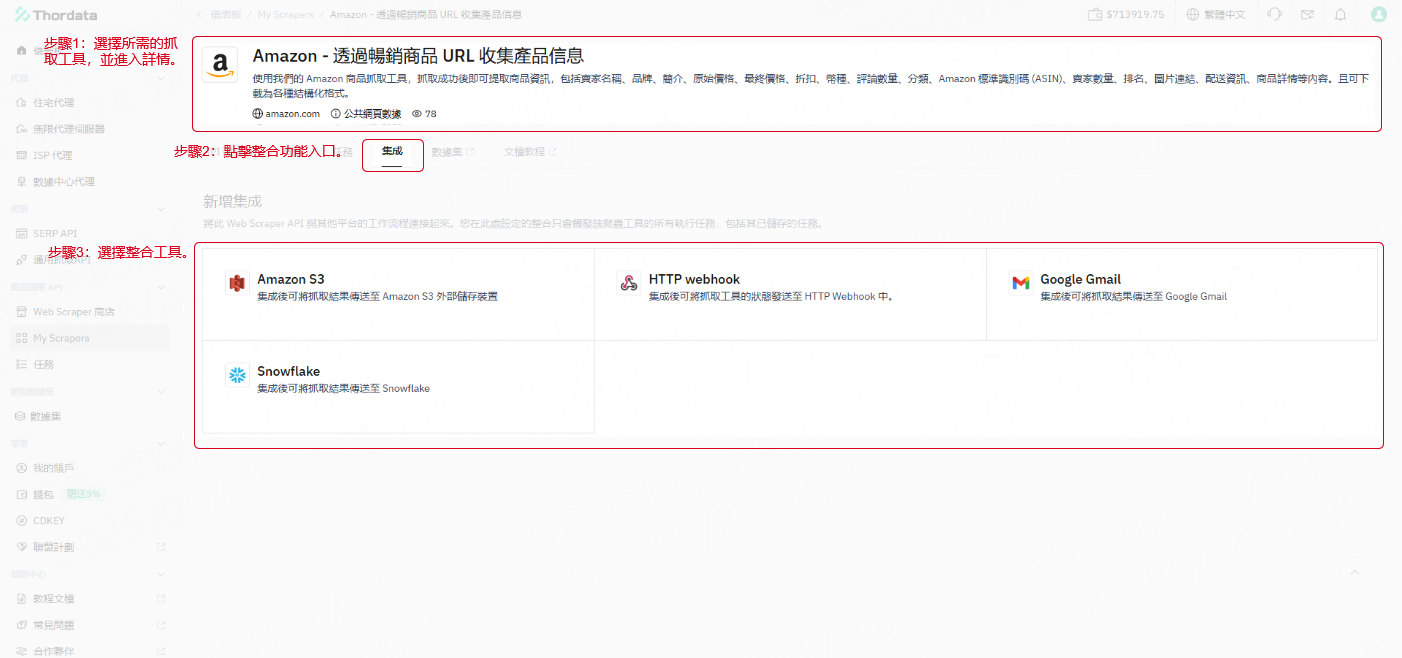
目前，Thordata 平台支援以下服務整合：

1. **Webhook**\
   當關鍵事件發生時（如任務完成、失敗等），即時向您或您的系統發送通知，便於後續處理與應對。
2. **Amazon S3**\
   可將成功運行的數據結果直接傳輸至您指定的 S3 儲存桶，實現數據的長期儲存與管理。
3. **Snowflake**\
   數據任務完成後，將結果自動同步至 Snowflake 數據倉庫，方便後續分析與建模。
4. **Gmail**\
   支援兩種方式：\
   ① 在任務執行過程中通過郵件通知您關鍵事件（如任務成功或失敗等）。\
   ② 將數據結果作為附件發送至指定信箱，便於您或團隊接收處理。

**開始使用整合功能**\
如果您正在開發一項產品或服務，並希望為您的用戶提供強大的數據自動化能力，Thordata 整合功能將是理想選擇。只需簡單設定，即可與現有系統無縫接軌，高效輸出結果。\
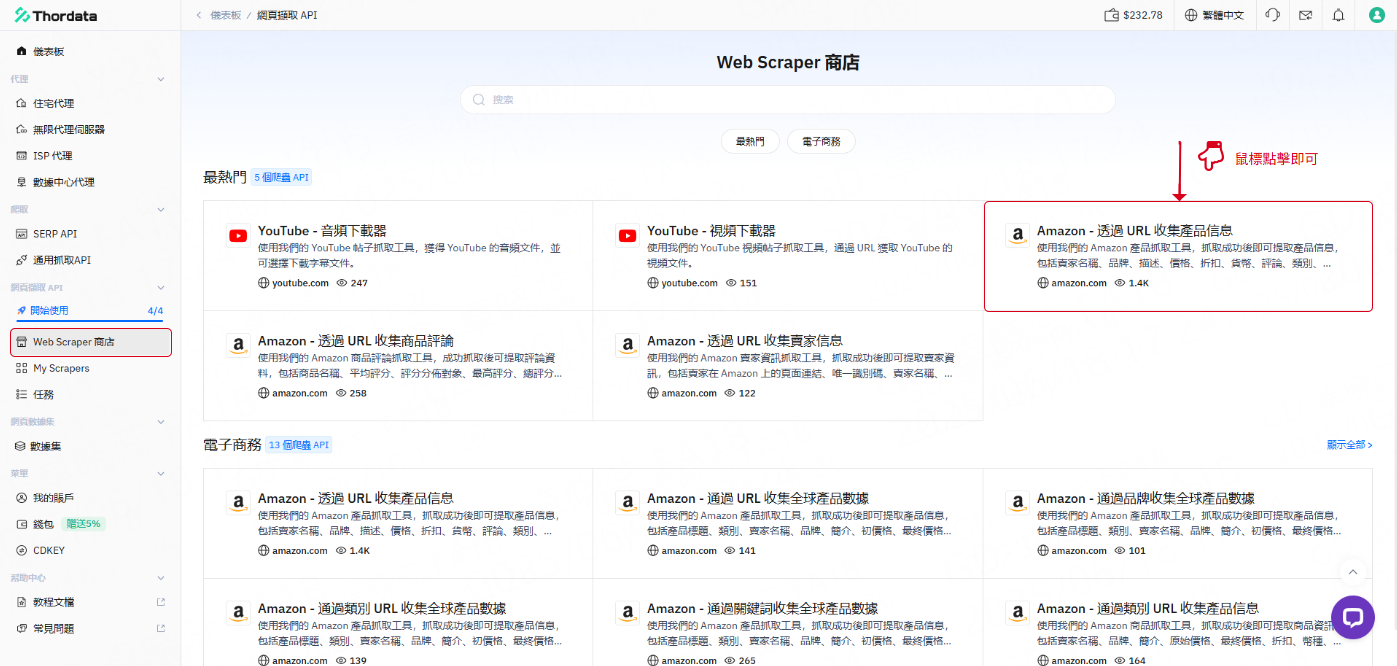
接下來，您可以造訪 Web Scraper 商店，探索各種整合插件與使用場景，打造適合自己的擷取流程。\
例如，您選擇：「Amazon - 透過 URL 收集產品信息」\
在該擷取詳情頁面中即可找到「集成」功能。

<div align="left"><figure><img src="/files/Bp4yGRsESGMqI78fBnRq" alt="" width="563"><figcaption></figcaption></figure></div>

<div align="left"><figure><img src="/files/jDr1NE5l5Z6DxOAIZ8DH" alt="" width="563"><figcaption></figcaption></figure></div>

如需進一步協助，歡迎隨時透過電子郵件 <support@thordata.com> 聯繫我們，我們樂意為您提供協助。


---

# Agent Instructions
This documentation is published with GitBook. GitBook is the documentation platform designed so that both humans and AI agents can read, navigate, and reason over technical content effectively. Learn more at gitbook.com.

## Querying This Documentation
If you need additional information that is not directly available in this page, you can query the documentation dynamically by asking a question.

Perform an HTTP GET request on the current page URL with the `ask` query parameter:

```
GET https://doc.thordata.com/doc/zh-hk/web-scraper-api/ji-cheng.md?ask=<question>
```

The question should be specific, self-contained, and written in natural language.
The response will contain a direct answer to the question and relevant excerpts and sources from the documentation.

Use this mechanism when the answer is not explicitly present in the current page, you need clarification or additional context, or you want to retrieve related documentation sections.